
Handheld throttle · WiThrottle · Z21 · LCC
Put the phone down. Pick up a knob.
The OCU-1 is a handheld that speaks three protocols: WiThrottle, the Roco Z21 LAN protocol and LCC. It joins your layout's Wi-Fi, finds your JMRI or DCC-EX server, your Z21 or your LCC hub, and hands you a detented knob, a 12-key pad and a crisp OLED you can read from across the room. Watch it go through the motions — that is the real screen, drawn with the real fonts, and the little train runs at whatever speed the knob says.
Part number TBA · Price TBA · Warranty TBA

Control
A throttle you can work without looking at it.
A phone is a good throttle right up until you need to look at it. The OCU-1 puts speed on a detented knob, direction on the knob's push, and the functions you use most on real keys, so the layout keeps your eyes and the handset keeps your hand.
Every key can be remapped on the setup page: horn on 2, bell on 1, or a key that fires a custom command you wrote yourself.
- Detented knob with acceleration: one step per click, a fast spin jumps five
- Push the knob to stop, push again to change direction — the knob light shows which way
- Keys 0–9 are F0–F9 straight off the pad; # opens the full list with your roster labels
- Latching or momentary per function, from the server or overridden on the setup page
Roster
Your locomotives, with the names you gave them.
The handset reads the roster off the server, so the loco you pick is the one you named in JMRI, not an address you have to remember. Pick it from the list with the knob or type the address on the keypad. If F6 is Bell on your layout, F6 says Bell on the OCU-1. A name too long for the line scrolls; it never gets cut off.
- Roster names, addresses and your own function labels, straight from the server
- Up to six throttles, each with a loco or a consist, switched with one menu key
- Consists built on the handset — add locos to a throttle and set each one’s direction
- Locos come back on their throttles at the next power-on, and after a Wi-Fi hop
Layout
Turnouts, routes and the fast clock.
Everything the protocol carries, the OCU-1 carries. On JMRI the turnout and route lists come from the server with the prefixes your system uses — pick LocoNet, NCE, DCC-EX or your own on the setup page — so what you see on the handset is what you see in JMRI. On a Z21 or an LCC layout turnouts go by accessory address, and the fast clock comes from the station or the layout's broadcast clock.
- Throw or close any turnout, by number or from the server’s list
- Fire routes without walking back to the panel
- The layout’s fast clock on the throttle screen, 12 or 24 hour
- Track power on and off, with an optional PIN so a visitor cannot
In action
The screen, going through the motions.
Every screen below is the real thing: the same 128 × 64 layouts and the same fonts the firmware draws, played back in your browser.
Power on to driving
Boot, join Wi-Fi, find the server, and the locos from last time are back on their throttles.
Menus you can turn through
Every menu, list and chooser can be walked with the knob and picked with a push. Or type the number.
Up to six throttles
Each throttle holds a loco or a consist. The other one’s speed and direction sit in the corner.
Consists, with direction
Add locos to a throttle, then set which way each one faces from one full-width list.
Roaming between access points
Signal bars drop, the handset scans, finds a stronger access point and hops. The train never notices.
Messages you can read
Every error and confirmation is a full-screen card for three seconds, then you are back where you were.
Joining a network
Pick from the networks it can see, or fall back to the setup hotspot and do it from your phone.
Finding a server
Saved servers first, then the network: WiThrottle and LCC hubs by mDNS, Z21 stations by asking the subnet — or type one in.
Three protocols
Save a server on the handset: pick WiThrottle, Z21 or LCC, type the address, done. The handset speaks whichever the server you choose uses.
Guest mode
Hand it to a visitor. They can drive; they cannot get into Setup.
Setup
Every setting, on a web page the handset serves itself.
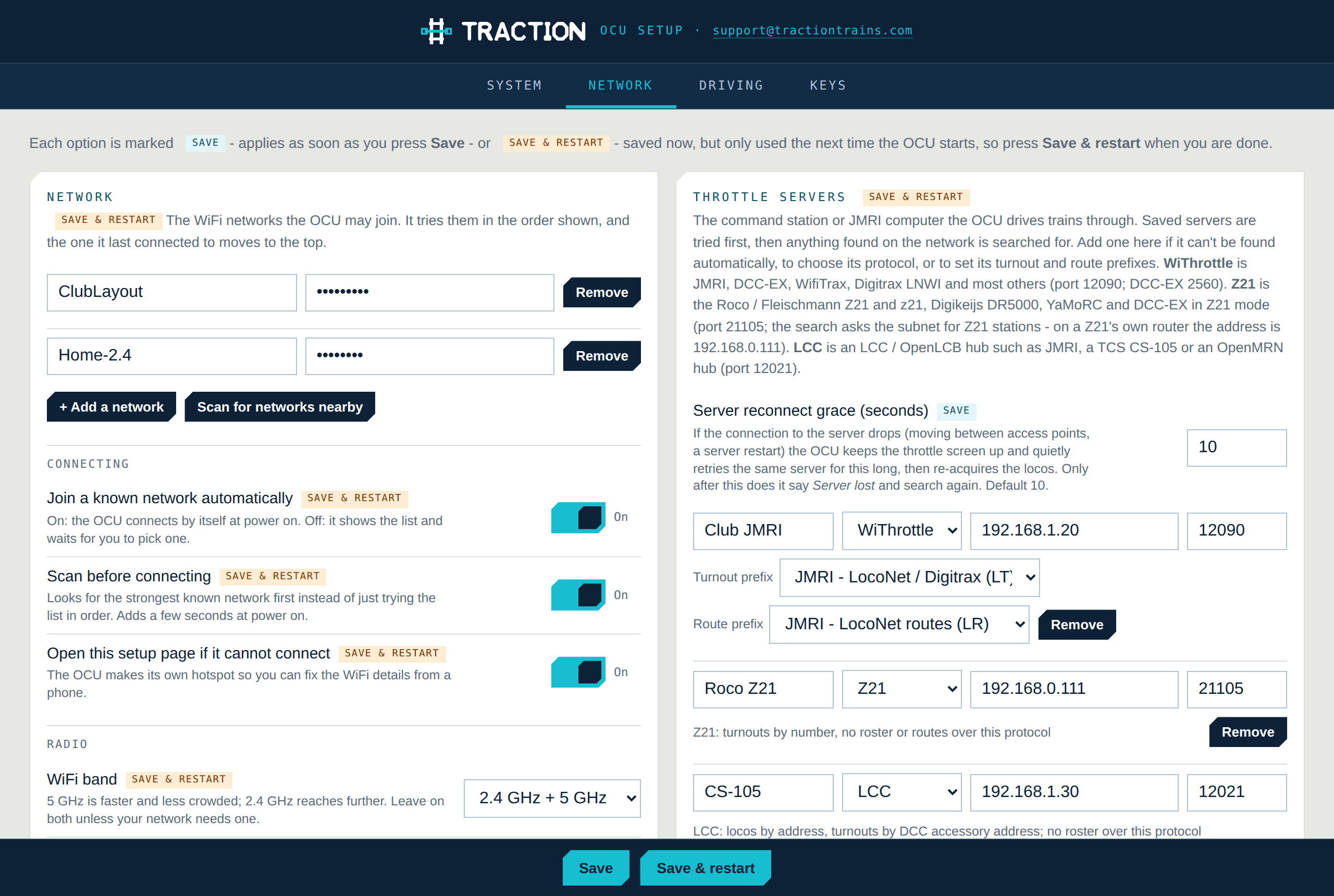
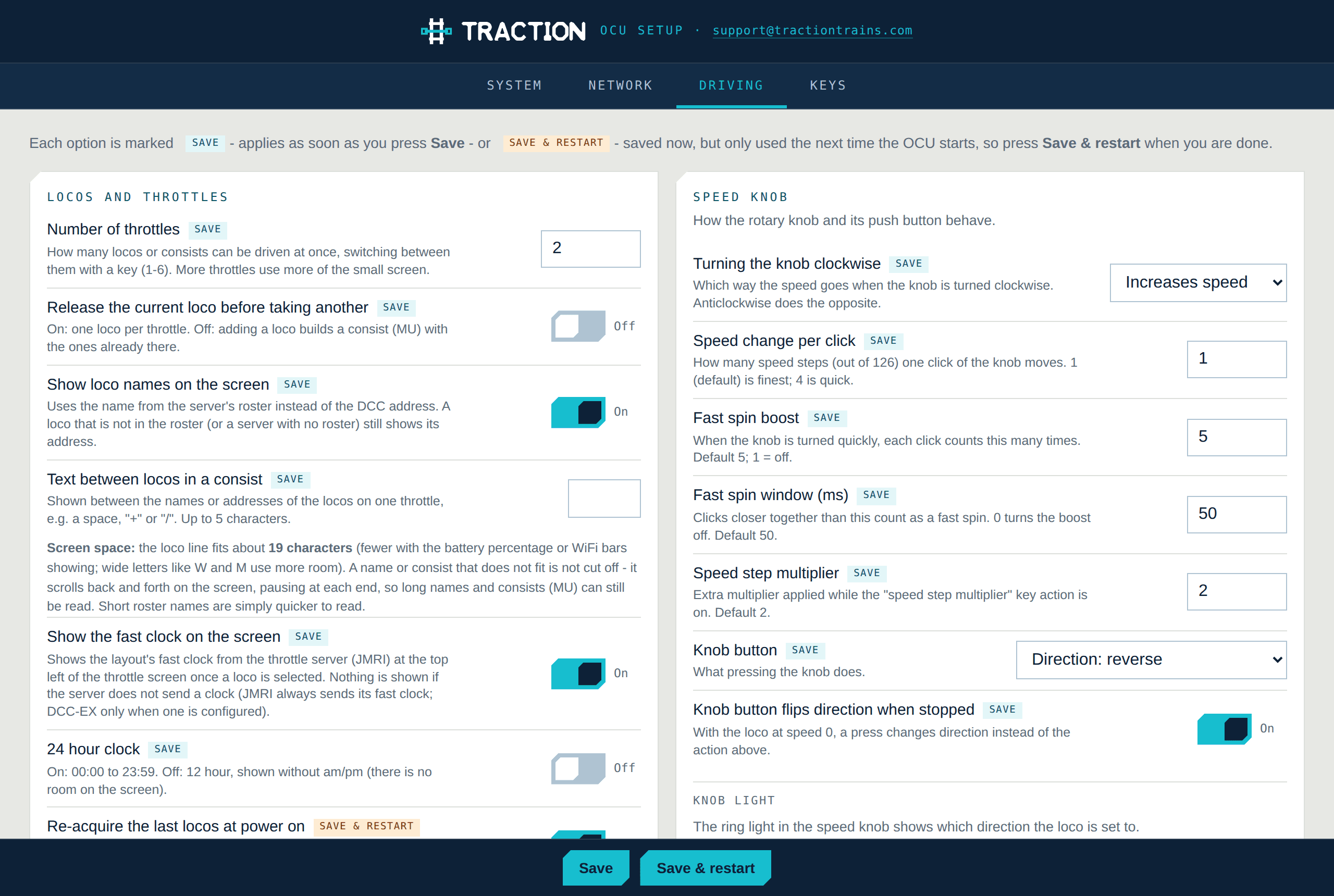
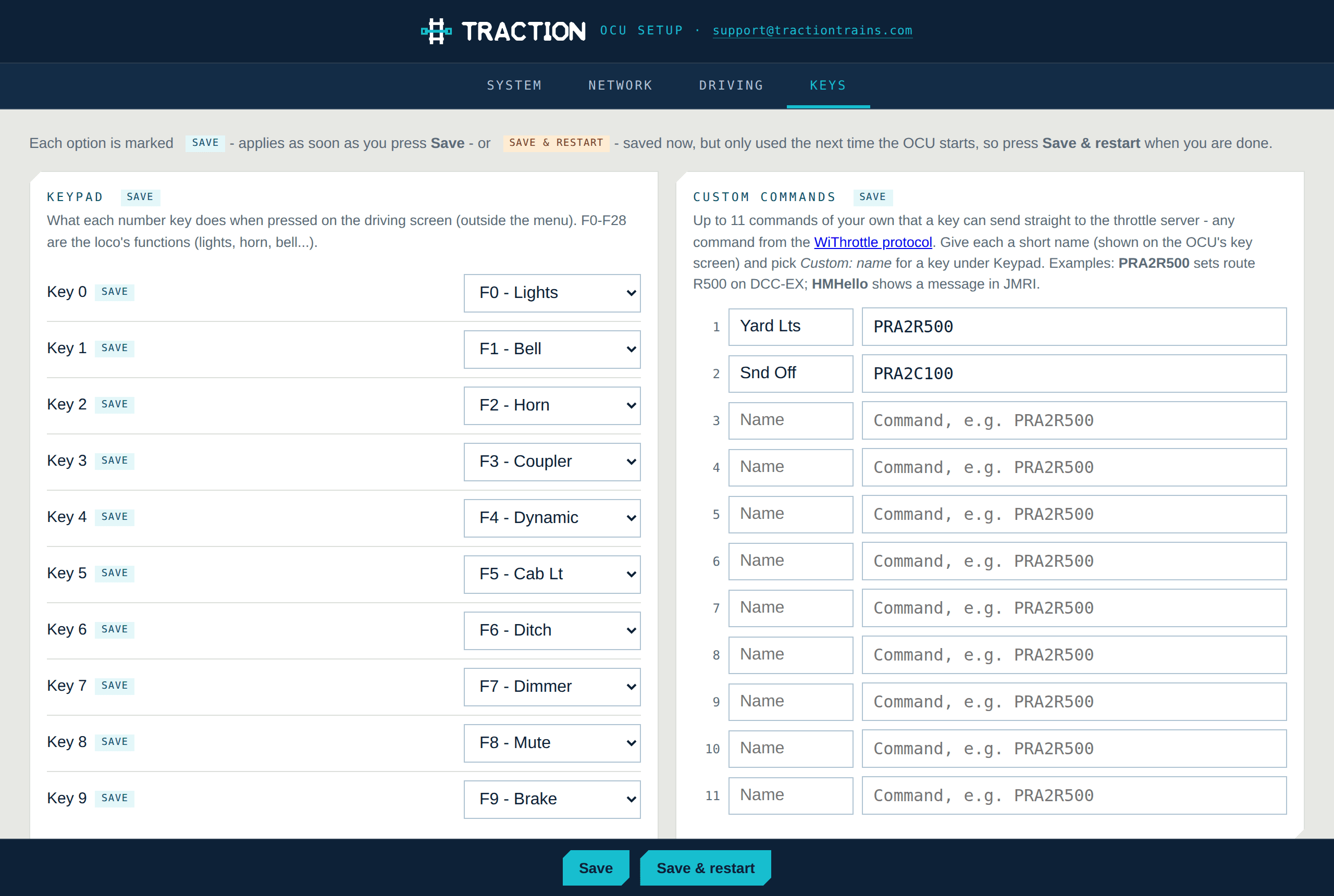
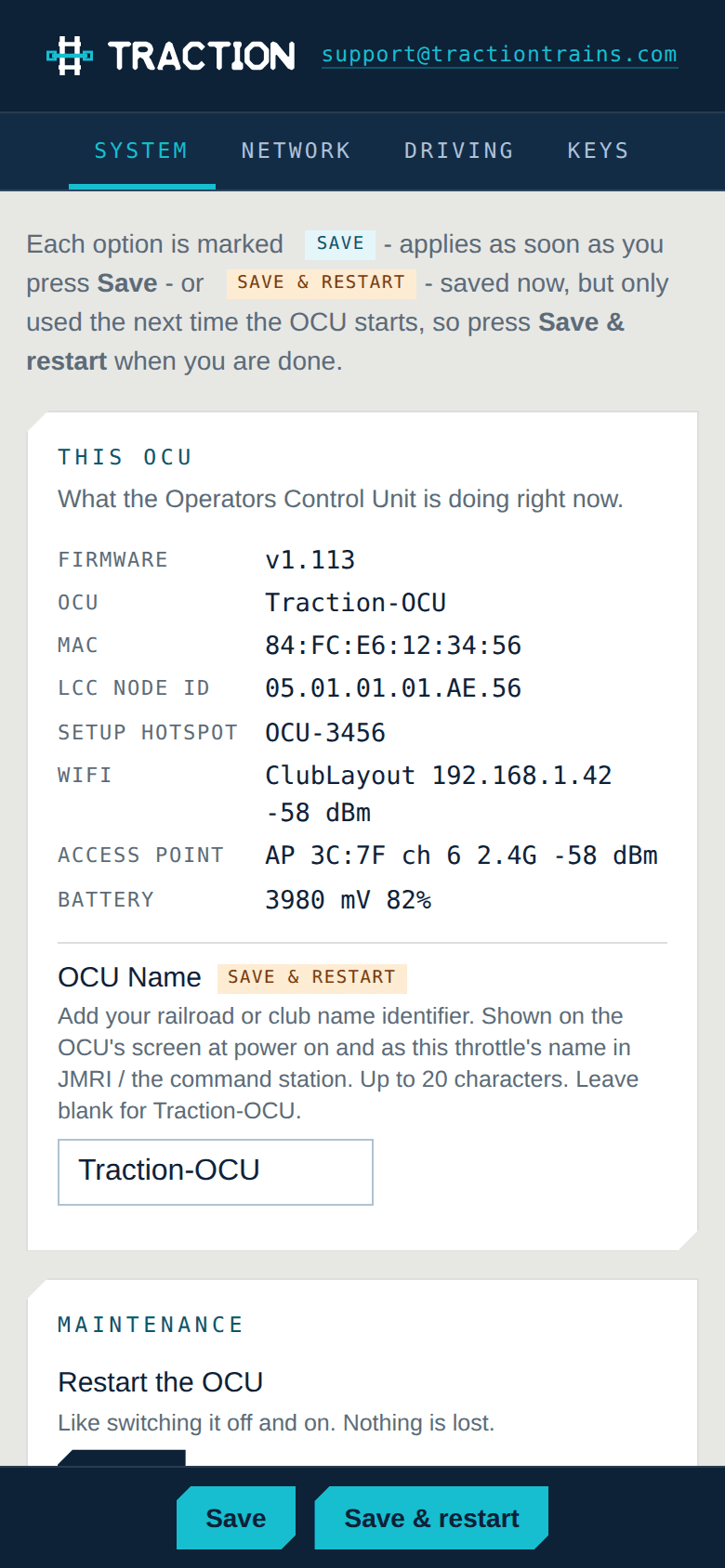
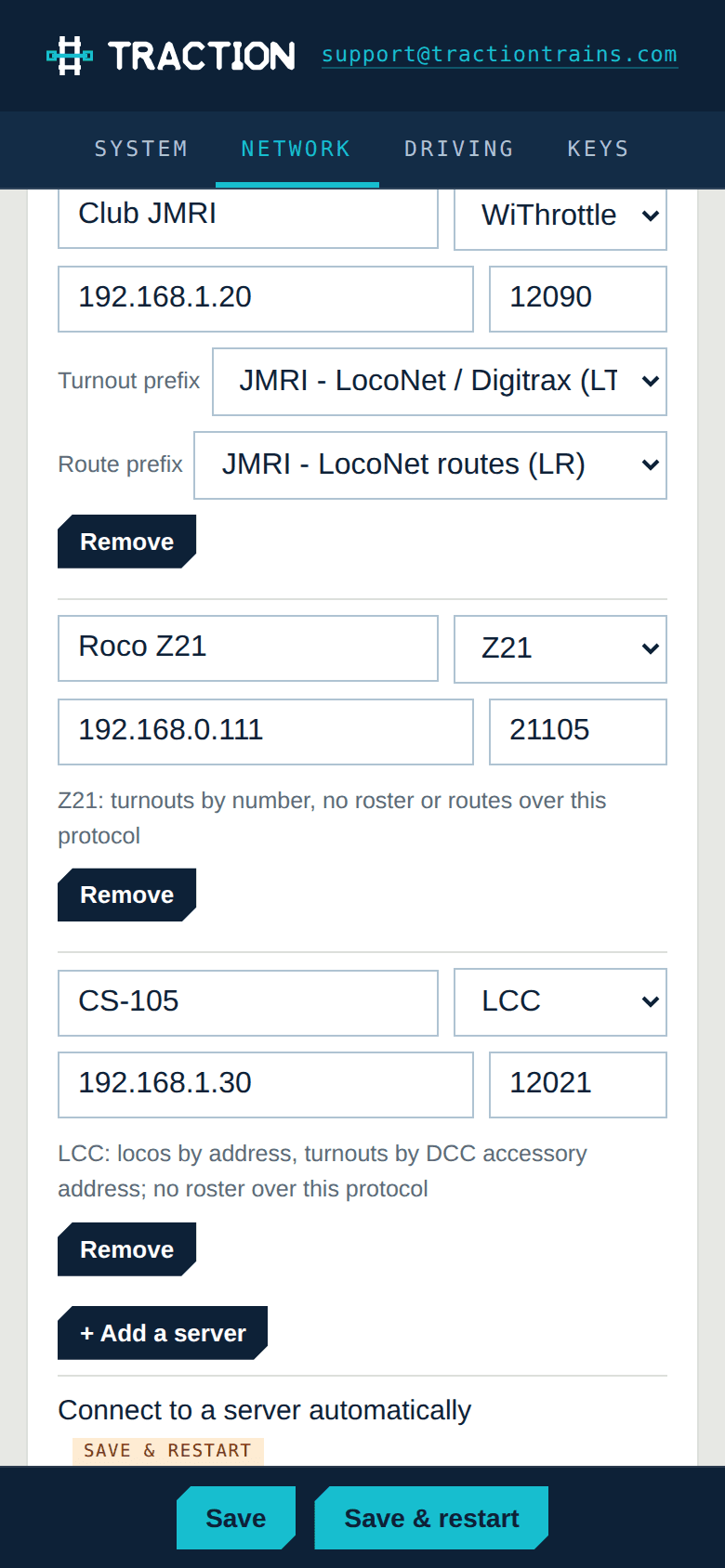
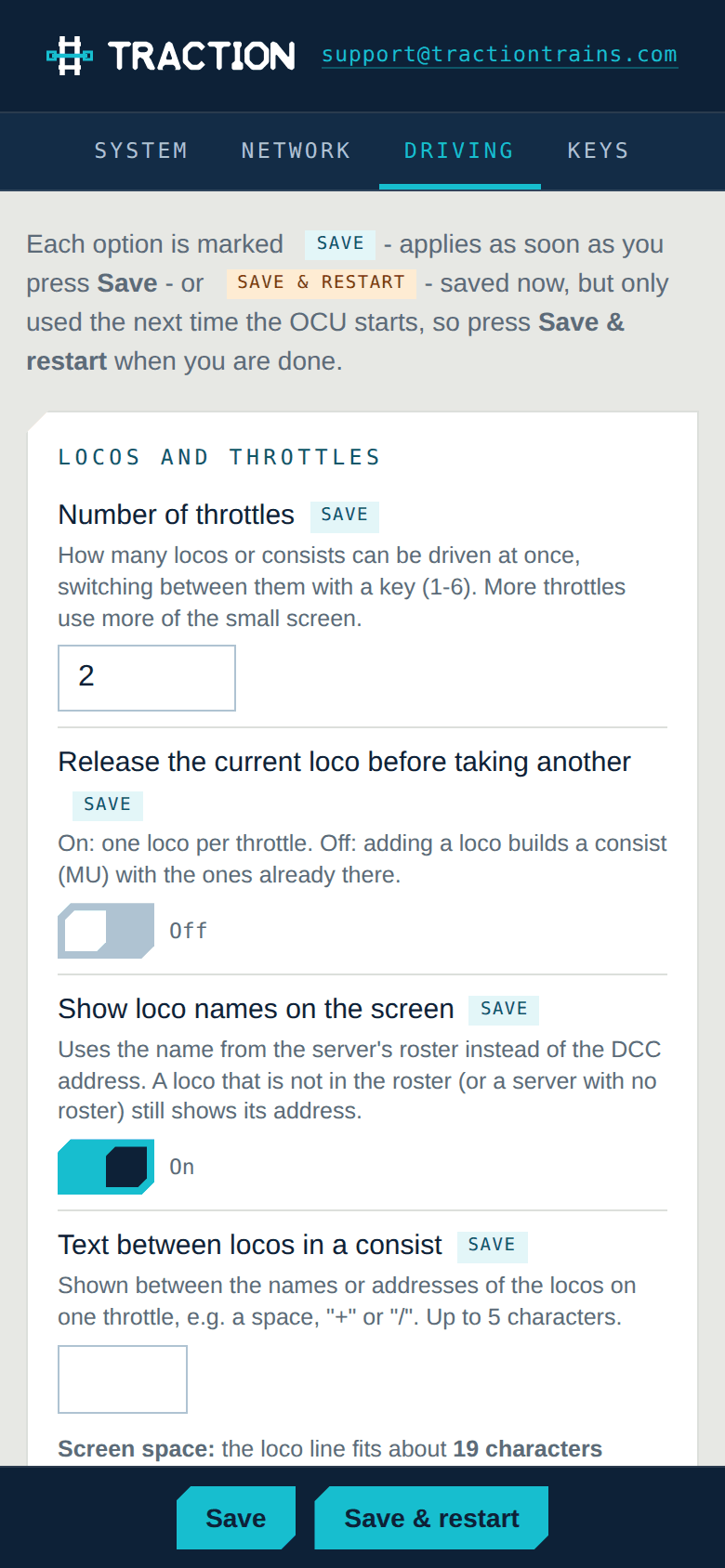
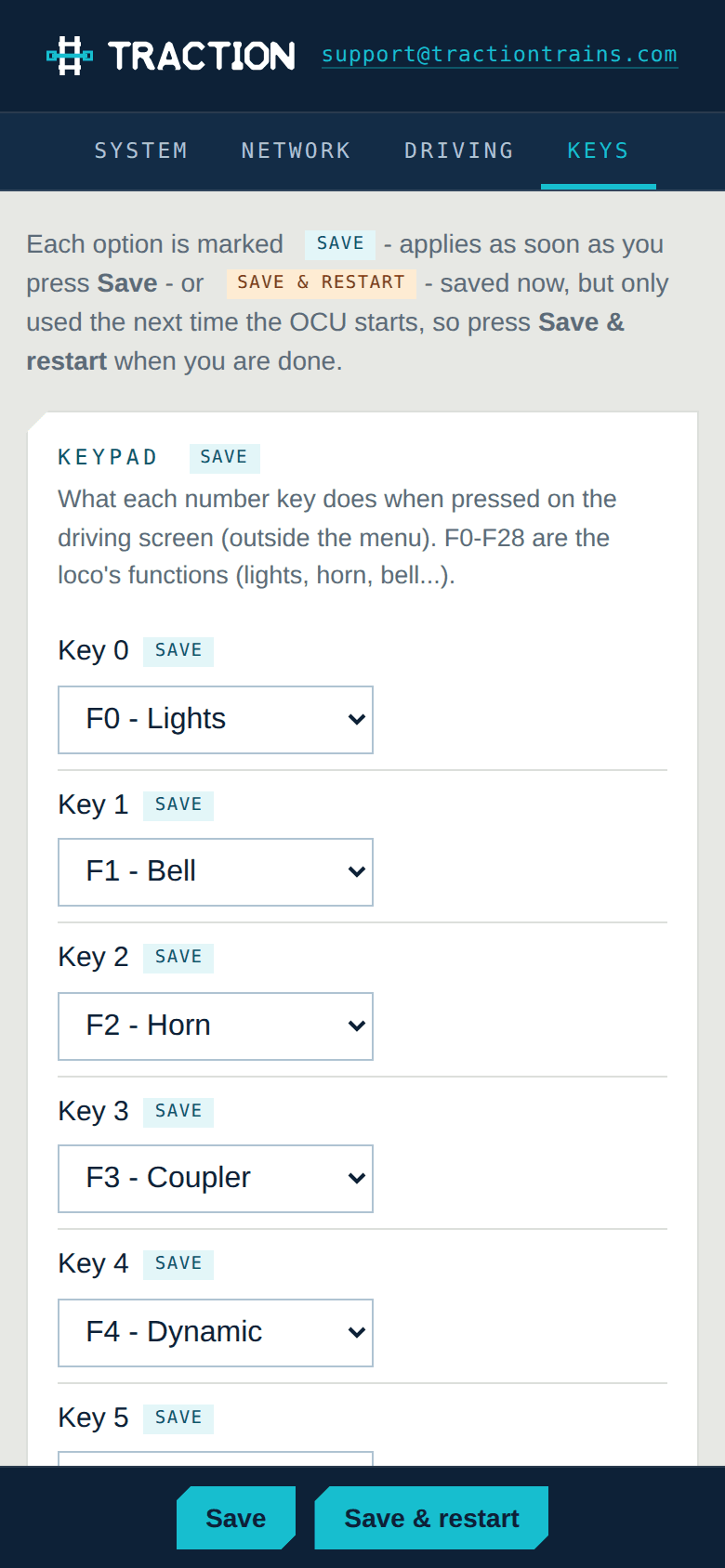
No app to install and no account. The OCU-1 runs a small web server: open the address shown in its Setup menu — or join its own hotspot on first power-on — and every option is there with a sentence explaining it. Each one says whether it applies at once or on the next restart.
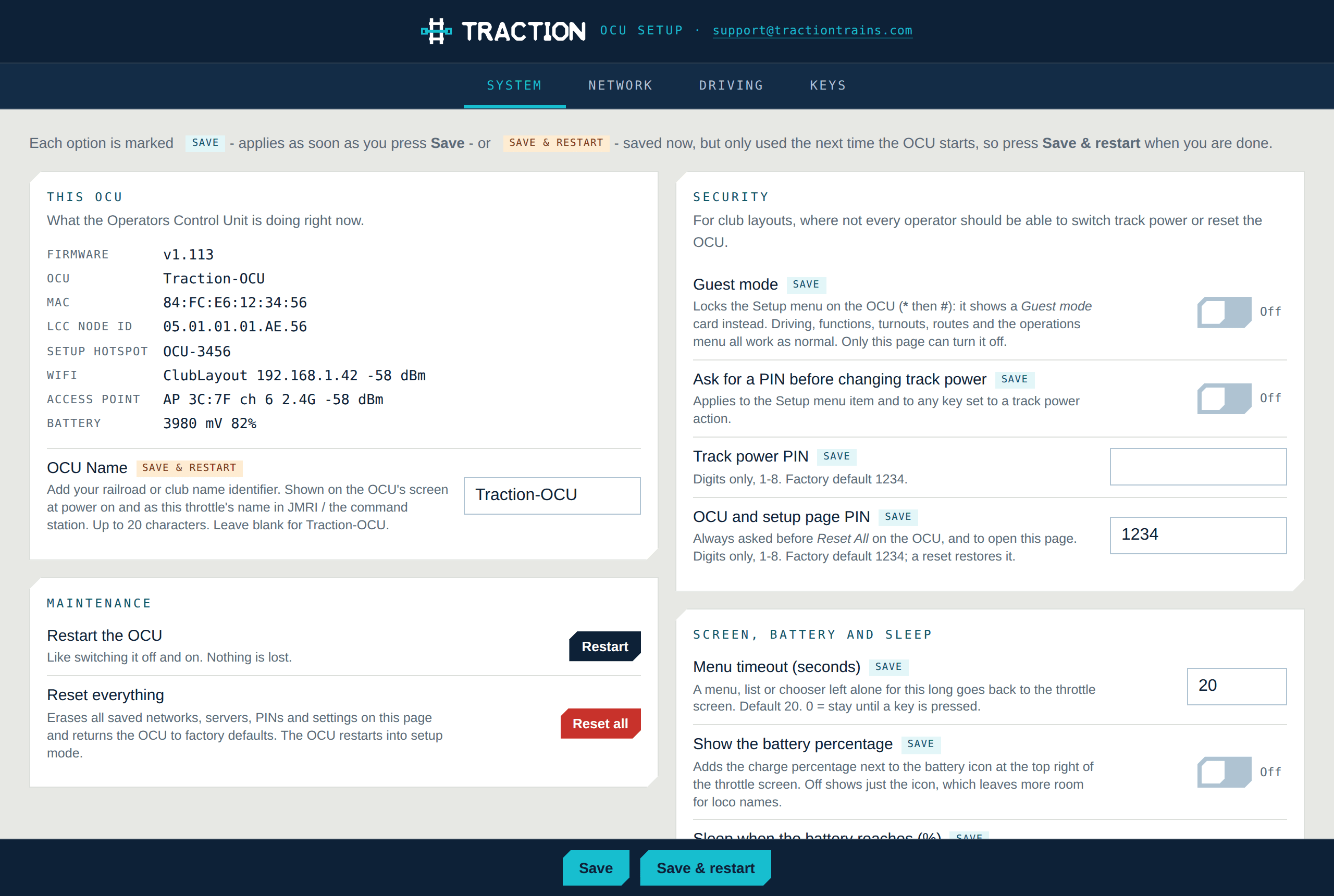
- System
- Name the handset, set the PINs, screen and battery behaviour, sleep timers, guest mode, and factory reset.
- Network
- Saved Wi-Fi networks (scan for them from here), band and roaming choices, and the throttle servers — each with its protocol, WiThrottle, Z21 or LCC, and for JMRI its turnout and route prefixes.
- Driving
- Number of throttles, loco names, consist spacing, fast clock, heartbeat, and how the speed knob behaves.
- Keys
- What each key does, what the knob push does, a name and a latching/momentary override for every function, and eleven custom commands.
Wi-Fi
Big layout, several access points, one handset that keeps up.
Club layouts are big, and a single access point never covers all of it. The OCU-1 treats every access point on your network as one network. Three signal bars sit beside the battery so you can see how it is doing, and the Info screen tells you which access point, channel and signal it is on — useful when you are placing them.
- Dual-band Wi-Fi 6: 2.4 GHz for reach, 5 GHz when that is what you have
- Picks the strongest access point for your network at connect time, preferring 2.4 GHz
- Watches the signal while you drive and hops to a better access point before the link fails
- A brief link loss keeps the server session; a longer one reconnects and re-acquires your locos
Specifications
Everything, written down.
Nothing here is a marketing number. Every line is a setting or a limit in the firmware, and if a figure moves after production this page moves with it.
Hardware
| Controller | Seeed XIAO ESP32-C5, RISC-V, dual-band Wi-Fi 6 |
|---|---|
| Display | 2.4 in OLED, 128 × 64, monochrome, I²C |
| Speed control | Detented rotary encoder with push switch and RGB knob light |
| Keys | 12-key tactile pad (0–9, *, #), every key remappable |
| Wireless | 2.4 GHz + 5 GHz, 802.11 b/g/n/ax, WPA2/WPA3 |
| Roaming | Best-AP selection, proactive hop on weak signal, 2.4 GHz preferred |
| Battery | Single-cell Li-Po, on-board charger and fuel gauge, capacity TBA |
| Charging | USB-C, runs while charging |
| Sleep | Auto-off after a set idle time, at a set battery level, or from the menu |
| Firmware | Over USB-C; release notes list every change |
| Setup | Built-in web page over Wi-Fi, PIN protected, phone or desktop |
| Part · price · warranty | TBA |
Protocol and network
| Protocols | WiThrottle (JMRI, DCC-EX, any server) · Z21 LAN (Roco / Fleischmann Z21 and z21, DR5000, YaMoRC, DCC-EX) · LCC / OpenLCB Train Control (TCS CS-105, JMRI hub, OpenMRN hubs), chosen per saved server |
|---|---|
| Discovery | mDNS _withrottle._tcp and _openlcb-can._tcp, Z21 subnet probe, saved servers, DCC-EX and Z21 hotspot addresses, manual IP |
| Speed | 0–126, 128-step, with a ×2 speed-step multiplier; Z21 locos driven in their own 14 / 28 / 128 step mode |
| Functions | F0–F31, latching or momentary, per-function override |
| LCC node | Registered OpenLCB node ID 05.01.01.01.AE.xx, Train Search, controller assignment, heartbeat |
| Direction | Forward, reverse, stop-then-reverse on the knob, emergency stop |
| Roster | Names, addresses and function labels from a WiThrottle server; by address on Z21 and LCC |
| Consists | Built on the handset, per-loco direction |
| Accessories | Turnouts throw/close and routes with per-system prefixes on WiThrottle; turnouts by accessory address on Z21 and LCC |
| Fast clock | JMRI / DCC-EX server clock, Z21 clock (fw 1.43+), LCC broadcast clock; 12 or 24 hour |
| Throttles | 1 to 6 on one handset |
| Resilience | Heartbeat, quiet server reconnect, locos re-acquired after a drop |
| Custom commands | Eleven raw WiThrottle commands, named, on a key or in the menu (WiThrottle servers) |
WiThrottle is a protocol implemented by the JMRI project; Z21 is a trademark of Modelleisenbahn GmbH; LCC is the NMRA’s Layout Command Control, based on OpenLCB. Traction is not affiliated with JMRI, DCC-EX, Roco, the NMRA, the OpenLCB group or the WiThrottle iOS application. Part number, price, battery capacity, mass and warranty terms will be published when production units ship.
Compatibility
What it talks to.
The OCU-1 is a WiThrottle, Z21 and LCC client. It never talks to the internet, and nothing about your layout leaves your network.
JMRI WiThrottle server
The reference implementation. Run JMRI on anything on your network and the OCU-1 finds it by mDNS, or takes an address if you would rather be explicit. Roster, turnouts, routes and the fast clock all come from JMRI.
EX-CommandStation
DCC-EX implements a WiThrottle server in the command station itself. Join its access point and the OCU-1 connects straight to 192.168.4.1 with no computer in the middle, or find it on your home network.
Roco / Fleischmann Z21 and friends
The OCU-1 speaks the Z21 LAN protocol directly: Z21 and z21, z21 start, Z21 XL, the Digikeijs DR5000, YaMoRC, and DCC-EX in Z21 mode. It finds the station on your network, drives each loco in its own speed-step mode, and shows what the app or another throttle is doing to it as it happens.
LCC / OpenLCB layouts
The OCU-1 is a registered LCC node. Point it at an LCC hub — a TCS CS-105, JMRI’s OpenLCB hub, an OpenMRN hub — and it finds trains with the Train Search protocol, takes control with the Train Control protocol, switches track power and throws turnouts with the standard events.
Anything speaking one of the three
The OCU-1 is a protocol client, not a client for one product. If your system exposes a WiThrottle server — Digitrax LNWI, MRC, an ESP32 project — a Z21-compatible LAN interface, or an LCC hub, the handset should connect to it.
Layouts that speak none of the three
A plain LocoNet bus, a DR5000 without its Z21 mode, an XpressNet station, an MQTT-native layout: put the Traction Throttle Bridge in front of it and the OCU-1 drives it over WiThrottle or LCC like anything else. One bridge serves every throttle in the room.
A command station and a network
The OCU-1 does not generate DCC and is not a booster. You need a command station and a Wi-Fi network — 2.4 or 5 GHz, one access point or several. No internet connection is required or used.
In the box
What arrives.
- 1OCU-1 handheld throttle, part number TBA
- 1USB-C charging cable
- 1Quick-start card: join the setup hotspot, add your Wi-Fi, drive
- —Lanyard, belt clip and printed manual: to be confirmed
Questions
The ones we actually get asked.
Do I need JMRI?
Only if your command station cannot be reached any other way. DCC-EX EX-CommandStation has a WiThrottle server built in, so a computer is optional — the OCU-1 will even join the command station’s own access point. A Roco Z21, a DR5000 or a YaMoRC is driven directly over the Z21 protocol, and a TCS CS-105 directly over LCC — no computer at all. With most other systems, JMRI is how you get a WiThrottle server on the network.
Which protocol should I pick?
Whichever your server speaks; the handset does the rest. Save a server on the setup page or the handset and choose WiThrottle, Z21 or LCC for it — the usual port fills itself in — or let the search find it and read the tag. WiThrottle is the richest (roster, function labels, turnout and route lists, custom commands); Z21 and LCC drive, switch power and throw turnouts by number. A handset can have servers of all three kinds saved and use a different one each day.
Does LCC work with JMRI alone?
Only for track power. JMRI’s LCC support drives other people’s trains; it does not offer its own locos as LCC train nodes. To drive a loco over LCC you need an LCC command station on the hub, such as a TCS CS-105. If your command station is on JMRI by some other connection, use JMRI’s WiThrottle server and pick WiThrottle for it.
How do I set it up without a computer?
From a phone. On first power-on (or whenever it cannot find a network) the OCU-1 makes a setup hotspot called Traction-OCU-xxxx. Join it, open http://192.168.4.1, add your Wi-Fi and tap Save & restart. Every setting the handset has is on that page; the same page is reachable on your normal network afterwards at the address shown in the Setup menu.
Does it need an internet connection?
No. The OCU-1 joins your local network and talks to your server. It makes no outbound connections, and there is no account to create.
My layout has more than one access point. Will it drop out when I walk around?
That is exactly what the roaming code is for. The handset connects to the strongest access point for your network (preferring 2.4 GHz for range), watches the signal while you drive, and when it gets weak scans for a better one and hops — the throttle screen shows Switching AP for a moment and your locos stay right where they were. Same on a single access point that has both bands.
How many locomotives can I run at once?
Up to six throttles per handset, each with a loco or a consist, switched from the menu. Run more by adding handsets — all three protocols are multi-throttle, and phone apps or the Z21 app can be on the same server at the same time.
What happens if the server disappears?
Two things. The handset honours the emergency-stop timeout the server sets, so a dropped link stops the train rather than leaving it running. And the handset keeps the throttle screen up and quietly retries the same server for ten seconds (adjustable) before it says Server lost and searches again — so a JMRI restart or a Wi-Fi hop is usually invisible, and your locos are re-acquired when it comes back.
Can visitors use one without changing my settings?
Turn on Guest mode on the setup page. The Setup menu on the handset is then locked — a visitor can drive, pick locos and throw turnouts, but cannot forget your Wi-Fi, change the server or reset anything. The setup page itself is PIN protected, and track power can have a PIN of its own.
Is the firmware open?
The OCU-1 runs open firmware built on the WiTcontroller project, on off-the-shelf parts: a Seeed XIAO ESP32-C5, a SparkFun Qwiic keypad, an Adafruit I²C encoder and a standard OLED. Release notes list every change, and reflashing over USB-C is always possible.
Order
One product, done properly.
We make one thing and we keep making it. The OCU-1 is built from parts you can buy yourself, on firmware you can read, and every change is written down.
Price, part number and warranty terms to be announced · Ask to be told when it ships